
Overview
- 8
- Participants, all iOS users in the Greater Seattle area
- ~40min
- Per session, in three parts
- 7
- Areas for improvement, rated severity 2 to 4
We tested the onboarding flow of the Hiya Mobile app, from the “Get Started” screen to the “Activation Complete” screen, with eight participants.
- Time Participants took about 3–5 minutes on average. This is probably longer than usual, because we asked them to think aloud.
- Completion Three of eight participants failed to activate one or more settings (Silence Unknown Callers, Full Incoming Screen Calls). One of them failed both. All three struggled with the Full Incoming Screen Calls setting, which caused unintended activation failures.
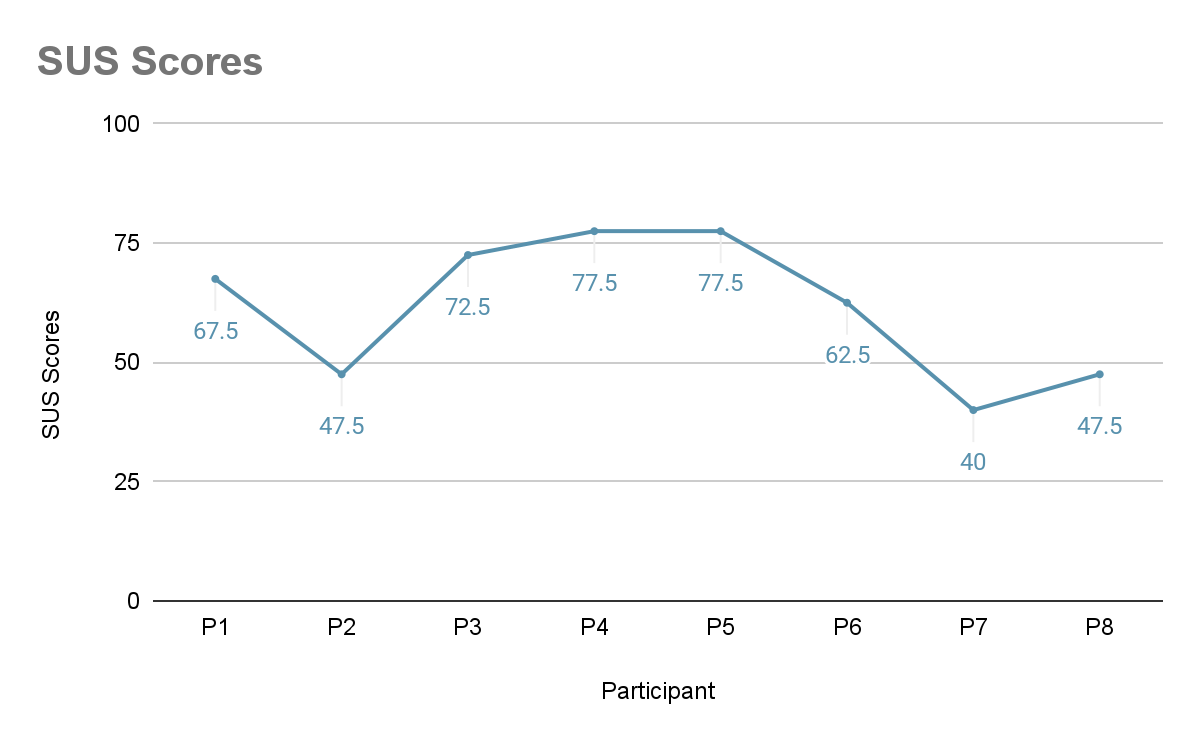
- Satisfaction Some users found onboarding fast and straightforward. Even so, the average System Usability Scale (SUS) score was 61.6, below the industry average of 68. There is room to improve.
We found seven areas for improvement, with severity ratings from 2 to 4 (4 is most severe). The top five, rated 3 or above:
| Sev. | Major finding | Recommendation |
|---|---|---|
| 4 | Users don’t really read the instructions because they look too wordy. | Use concise instructions and add visual cues to keep reading interesting. |
| 4 | Even when users try to read, the instructions are confusing. | Show only what users need to finish onboarding, with clear, precise phrasing and visual cues. |
| 4 | Users don’t understand app features and are concerned about reliability. | Use real-life scenarios and visual aids to show how the system works and what happens for the caller and recipient of a screened or forwarded call. |
| 4 | Users don’t know if a task is completed or if it’s functioning. | Give immediate feedback and error messages, plus shortcuts to fix the error. |
| 3 | There is too much back and forth between Settings and the app. | Reduce the need to switch between iPhone Settings and the app. |
Study objectives
We wanted to find and address critical usability issues in onboarding, and to gather participants’ attitudes towards it. Our goals were to assess:
- The overall ease of use of onboarding.
- User satisfaction with onboarding.
- How trustworthy users find Hiya, based on onboarding.
- The obstacles to completing key onboarding tasks.
Research questions
- How easily do users get through onboarding?
- How clearly do users understand the instructions?
- How satisfied are users with onboarding?
- How well does onboarding build trust in the app?
- How well do users understand the app’s features after onboarding?
- What stops users from completing onboarding?
Method
We ran eight in-person usability sessions. Participants thought aloud as they went through onboarding, voicing their intentions, expectations and reactions. We video-recorded their hand movements and the interviews.
Session flow
Each session had one participant, one moderator and one note-taker, and lasted about 40 minutes in three parts:
- Onboarding (20 min). The participant signed a consent form, then went through Hiya onboarding on their own phone. The moderator sat opposite, guided them through the protocol and gave hints only when needed. The note-taker sat beside them and noted their performance. Two cameras recorded this part.
- After-task questionnaire (5 min). The moderator and note-taker left and the cameras stopped. The participant rated perceived ease of use, satisfaction and understanding of onboarding.
- Interview (15 min). The moderator asked about the onboarding experience while the note-taker took notes. Afterwards, we recorded the participant’s phone model, iOS version and carrier. One camera recorded this part.
Participants
We recruited eight participants through online postings, with a range of tech skills and experience with call-screening tools. With the Hiya team, we chose to focus on iOS users on Verizon, AT&T or T-Mobile.
All eight dislike spam calls. Six had never used a call-screening tool other than the iPhone default. One of the other two (P5) used Verizon’s call screener.
Every participant:
- Uses iOS with a US-based number
- Has only one phone line on the device
- Uses Verizon, AT&T or T-Mobile
- Had never used Hiya
- Is 18 or older
- Lives in the Greater Seattle area
- Has enough English to follow the instructions
Findings and recommendations
What users like
- Test call. It lets users check the app works and learn how it behaves before committing.
- UI style of buttons and icons. It feels similar to iOS.
- 3-day free trial. Users can see if the app meets their needs before subscribing or paying.
SUS score
- 61.6
- Average SUS score across all eight participants
- 77.5
- Highest score
- 40
- Lowest score
- 68
- Industry average, for comparison
Severity scale
| Severity | Meaning |
|---|---|
| 0 | I don’t agree that this is a usability problem at all |
| 1 | Cosmetic problem only: need not be fixed unless extra time is available on the project |
| 2 | Minor usability problem: fixing this should be given low priority |
| 3 | Major usability problem: important to fix, so should be given high priority |
| 4 | Usability catastrophe: imperative to fix this before the product can be released |
Users don’t really read the instructions because they look too wordy
Users want to finish onboarding as fast as possible, so they skip instructions that look wordy. Wordy instructions also raise cognitive load: users must remember how to set everything up. That makes onboarding feel hard, and suggests the app will be hard to use too.
Evidence
- 5 of 8 participants said they skipped instructions, or were seen doing so, and had to go back to check setup details.
- 3 of 8 said outright that onboarding had too many words and sentences.
“I was probably confused because I didn’t really read the instructions. Like when I have to go to my setting and change the full screen call, I didn’t really read the instructions because I was trying to get it done fast.” — P8
“Level of understanding of app features are not high, wasn’t paying too much attention with all the wording…” — P7
Recommendations
- Use concise, straightforward instructions.
- Add visual cues to keep reading interesting.
Even when users try to read, the instructions are confusing
This issue varied more from user to user. Affinity mapping grouped the confusing instructions into five types: inconsistent phrasing, imprecise description, misleading visual cue, unnecessary info, and unnecessary flow.
Overall recommendation: show users exactly the information they need to finish onboarding, with clear, precise phrasing and visual cues.
Inconsistent phrasing
Four participants weren’t sure whether “Real Time Protection” meant the Premium plan.
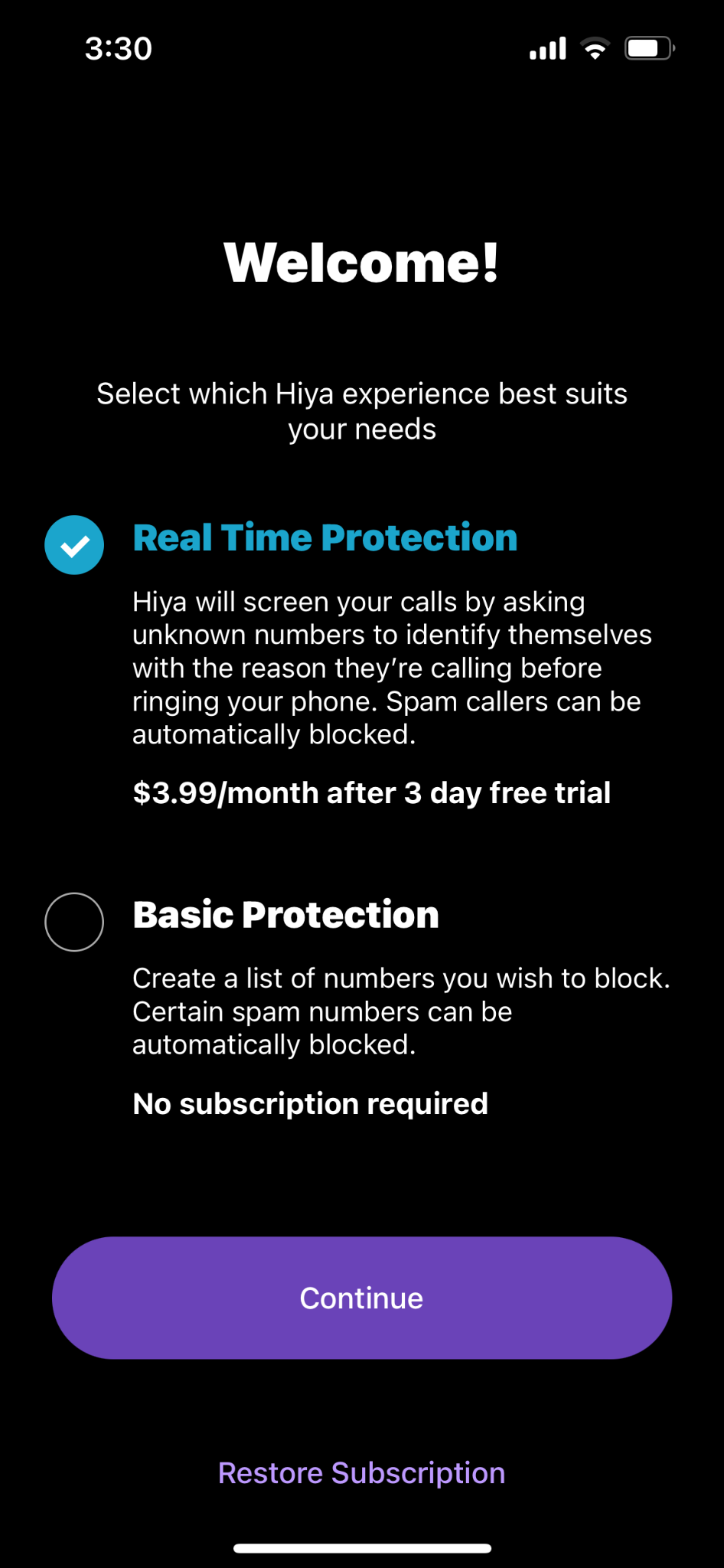
“Not sure if real-time is premium…” — P1
“Am I doing the upgraded plan?” — P8
Recommendation: use the same wording throughout the app.
Imprecise description
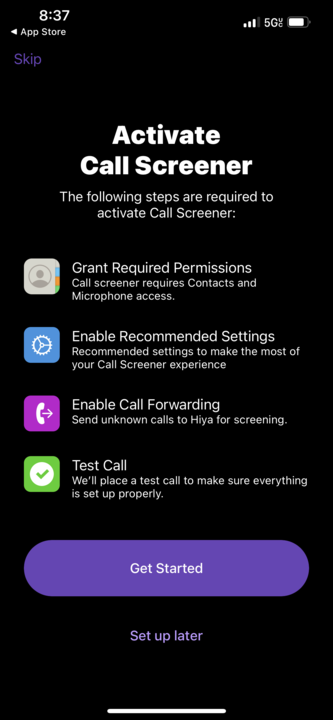
Three participants didn’t know there would be two calls (the test call and the screened call), or when to decline or answer.
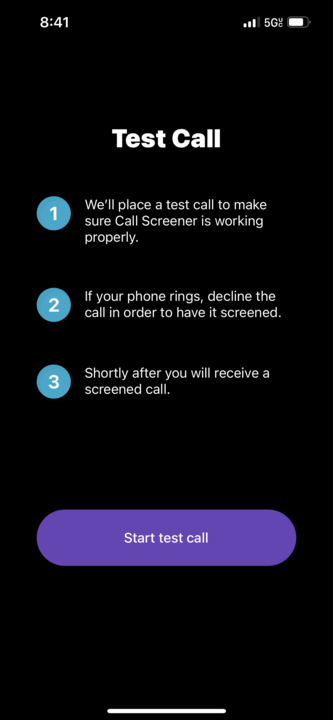
(Declined the first call) “So that’s what happens, you decline…” (Second call came) “Oh..and then answer or decline?” — P6
Recommendation: describe the process, and what users need to do, more clearly and fully.
Misleading visual cue
Two participants saw the test call’s progress bar and weren’t sure whether to decline the call themselves or whether the app would do it.
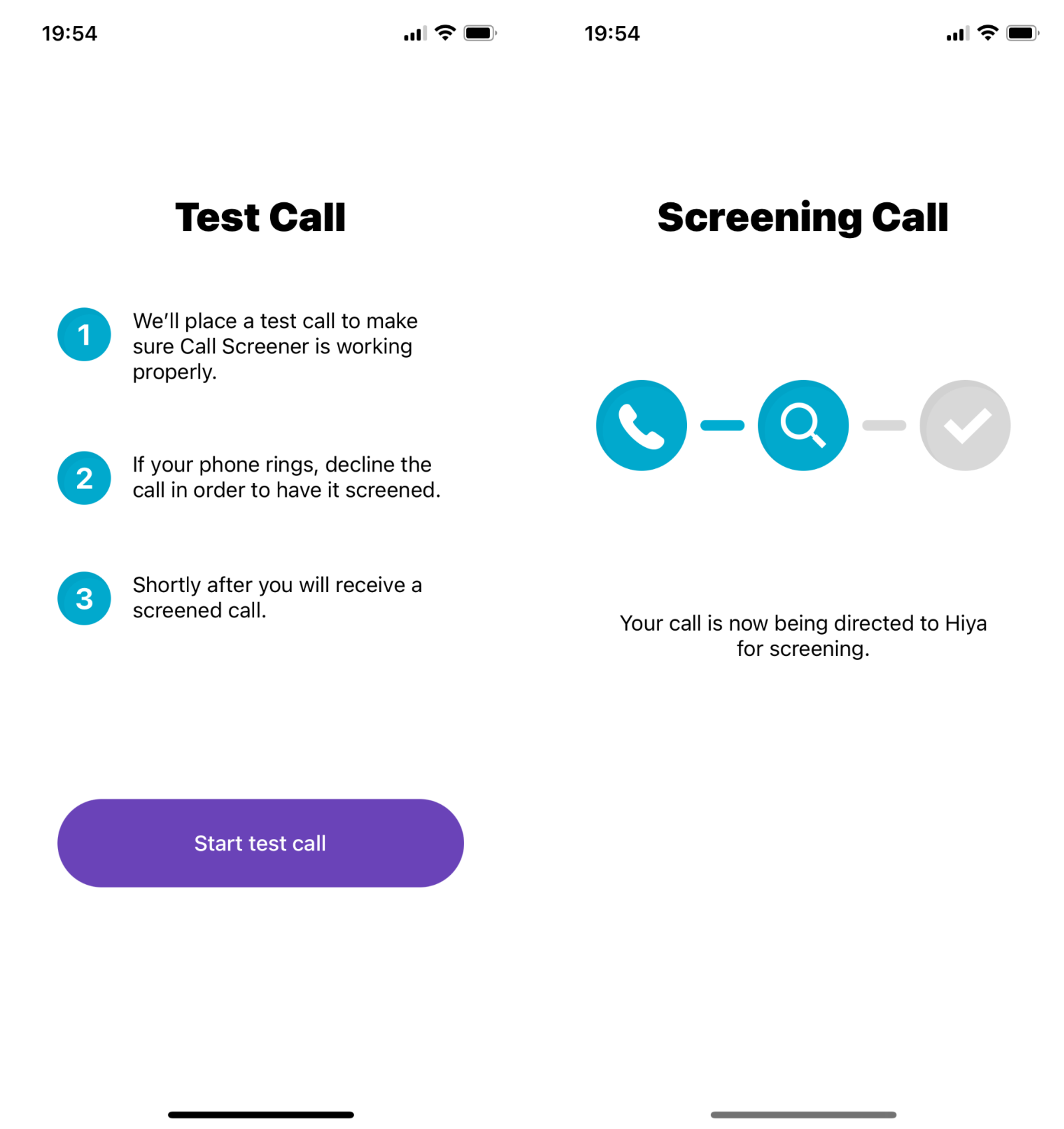
“The test call part was confusing. Not sure if i should decline the call or the app is doing it on itself.” — P3
Recommendation: make visual cues and written instructions say the same thing.
Unnecessary info
Two participants were confused by onboarding screens that exposed interactions between the app and the back-end system.
“As a user, I don’t want to get involved in the interaction between the Hiya app and the system, but I had to confirm every step.” — P2
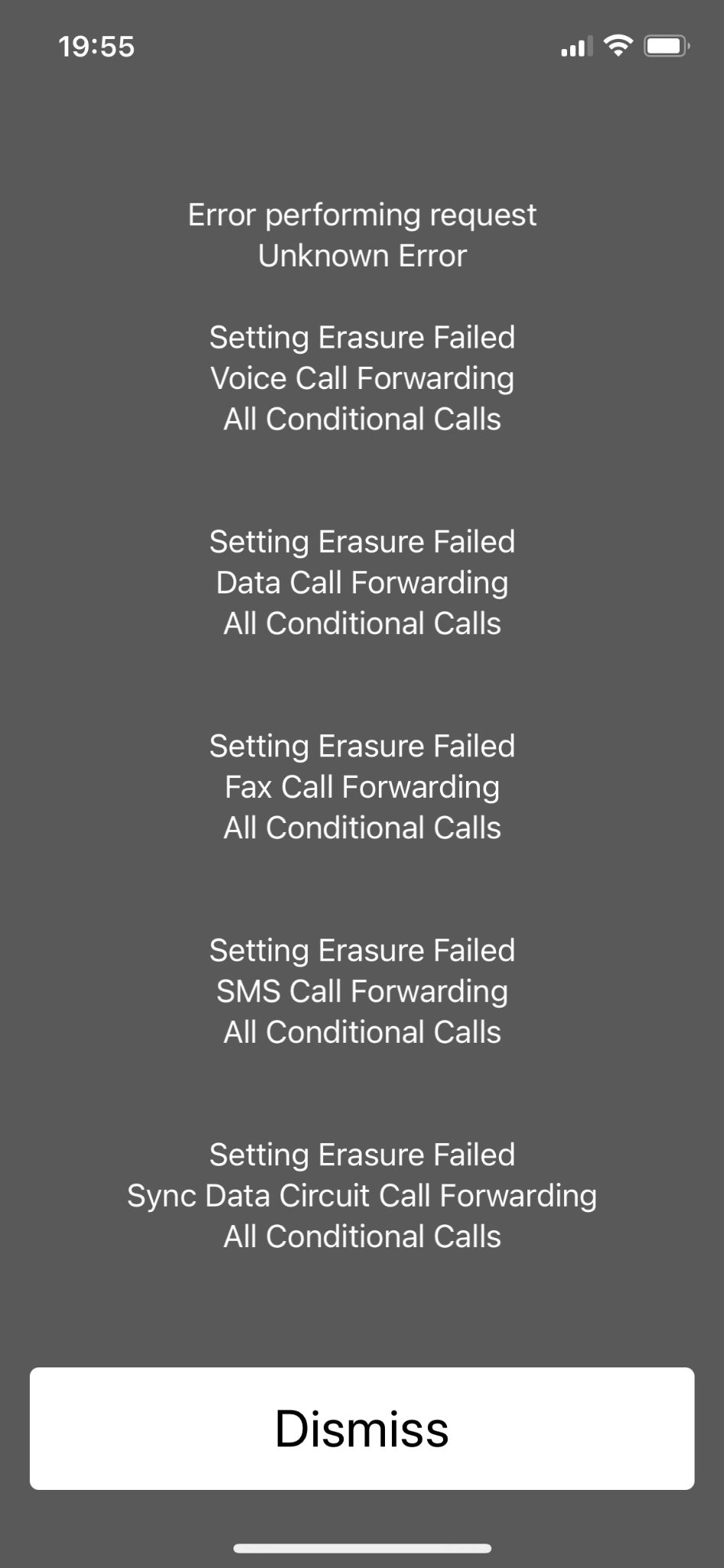
“That page should be clear for people to understand…” — P4
Recommendation: hide app–system interactions that users don’t need to see.
Unnecessary flow
One participant was confused that the app didn’t open the exact phone setting page they needed.
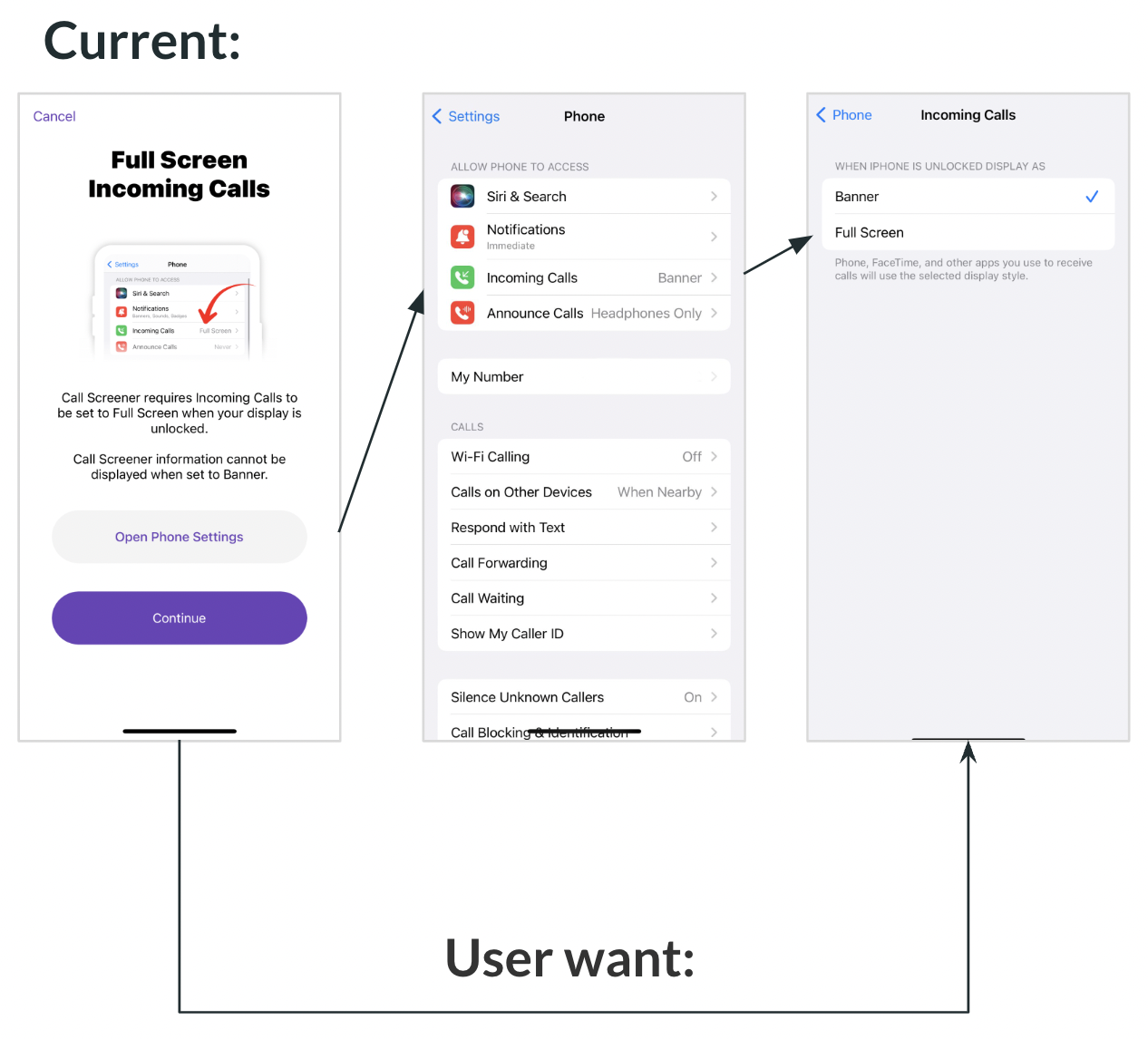
Recommendation: always send users to the exact phone setting page for the step.
Users don’t understand app features and are concerned about reliability
Evidence
- After onboarding, three participants weren’t clear how the features work, which made them doubt Hiya’s reliability.
- Two of them also didn’t understand what would happen for the caller and the recipient in real life.
“I don’t think I will use this app after today’s session because I don’t really understand what this app is really for after the onboarding process.” — P8
“What literally will happen if I get a phone call from an unknown number? I’m not clear.” — P1
Recommendation: use real-life scenarios and visual aids so users understand with confidence how the system works, and what happens for the caller and recipient of a screened or forwarded call.
Participants don’t know if a task is completed or if it’s functioning
Evidence
- If participants returned from iPhone Settings to the app without changing anything, the app assumed the step was done. Three participants didn’t activate full screen but believed they had. Two of the three weren’t sure they’d done everything right and didn’t know how to check.
- The app gave no clear status, so participants had to check for themselves.
“Few screens where I would click through and be unaware, it’d almost skip that step. I wasn’t sure if I did that right. This makes me want to go back to my settings and look…” — P7
Recommendation: give immediate feedback and an error message, with shortcuts to fix the error.
Users complained about having too many steps
Evidence
- Four participants complained that onboarding had many steps or too many steps.
- One of them felt it took longer than they wanted.
- One felt there were many unnecessary back-end interactions that needed their input.
“There are too many steps!” — P8
“Wish there were fewer steps in setting changes and the onboarding process was simpler.” — P5
Recommendations
- Use more visual cues and less text.
- Separate account creation from service activation to break up the process.
- Involve users less in back-end interactions.
Too much back and forth between Settings and the app
Evidence
- Three participants struggled to get back to the app because they tapped the wrong back button. This caused confusion, extra taps or unintended activation failures.
- One more participant found the switching between iPhone Settings and the app redundant.
“Where did the app go? Ughh doesn’t get back to the app.” — P1
“I hope they can condense everything into one single stage of steps. All this back and forth setting process, and I have to enable notification at the same time, so I don’t have to deal with settings again.” — P2
Recommendation: reduce the need to switch between iPhone Settings and the app.
Users don’t want to give access due to privacy concerns
Evidence
- Four participants didn’t want to allow microphone or contacts access. They didn’t know why the permissions were needed.
- One of them didn’t trust the app because it screens every call, and there was no clear proof it wasn’t collecting other information.
“I don’t want to allow the app to access my contacts…but it looks like I have to…” — P8
Recommendation: explain Hiya’s approach to privacy and how data is used.
Next steps
- Compare user groups. Compare users by factors such as culture and tech savviness.
- SUS results split widely: some participants rated onboarding well above the 61.6 average (up to 77.5), others below 50. More research could show whether traits like tech savviness explain the gap. Testing with more specific user groups could then uncover more detailed issues.
- Hiya is available in many countries. Research on cultural differences in onboarding could help Hiya offer more personalised, delightful versions.
- Validate the redesign. After redesigning based on these recommendations, run another round of testing with the SUS to measure the impact of the changes.